
Automation Anywhere6.0 - Download
You'll be able to download in few seconds.
Publisher Description
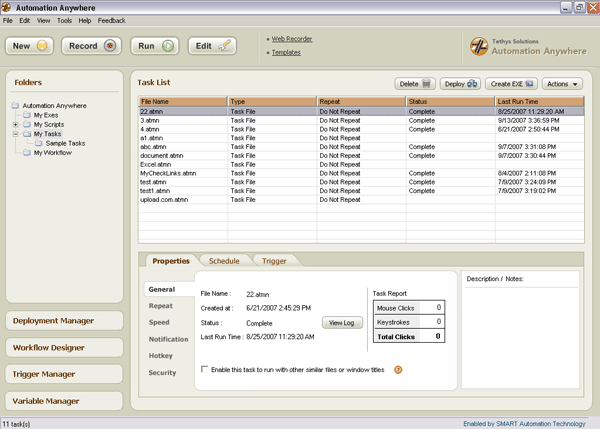
Automation Anywhere is an intelligent automation software for IT & business processes. Automate & schedule complex tasks in minutes, without any programming. Record keyboard & mouse or create automation scripts with drag and drop actions. Features SMART Automation Technology(r), scheduler, repeat options, web recorder, variable & debugging support, task-chaining, conditional, file, system, database & Internet commands, single click web data extraction & web mining, Turbo-speed, IE plug-in & more.
Automation Anywhere Premier includes features like XML, Schedule Manager, Windows Object Recorder, Visualize Technology, ROI Calculator, Report Designer, Remote Deployment, Image Recognition, Advanced Error Handling, Workflow Designer, Task Queuing, etc. Visualize Technology shows pictorial views of tasks in a storyboard view. The pictorial view of respective actions makes it easier to understand, edit and manage tasks. Deployment capability allows single click remote task administration and deployment without having to install the product on the remote PC.
Premier license allows task to exe capability for deploying tasks. Businesses & IT divisions can generate exes to manage & configure software, alter software behavior, create interactive scripts that take user inputs & more.
About Automation Anywhere
This Automation Tools program is available in English. It was last updated on 29 September, 2026. Automation Anywhere is compatible with the following operating systems: Windows.
The company that develops Automation Anywhere is Tethys Solutions, LLC. The latest version released by its developer is 6.0.
The download we have available for Automation Anywhere has a file size of 27.3 MB. Just click the green Download button above to start the downloading process. The program is listed on our website since 2010-04-12 and was downloaded 0 times. We have already checked if the download link is safe, however for your own protection we recommend that you scan the downloaded software with your antivirus. Your antivirus may detect the Automation Anywhere as malware if the download link is broken.
How to install Automation Anywhere on your Windows device:
- Click on the Download button on our website. This will start the download from the website of the developer.
- Once the Automation Anywhere is downloaded click on it to start the setup process (assuming you are on a desktop computer).
- When the installation is finished you should be able to see and run the program.
Program Details
System requirements
Download information
Pricing
Version History
version 6.0
posted on 2010-04-12
Added many new features like XML, Schedule Manager, Windows Object Recorder and many more. Also added functionality for Find/Replace in Excel, added support for timeout in 'Extract Data' and 'Extract Table Command' in Web Recorder and much more.
version 4.5.1
posted on 2008-03-12
Added many new actions to automate Windows controls in background. Many new features like nested task support in create exe and deployment, stored procedure support in database actions, email actions allows attachment, image recognition is 50 times faster and more.
Disclaimer
External Download
We do not host Automation Anywhere on our servers. We did not scan it for viruses, adware, spyware or other type of malware. This app is hosted by the software publisher and passed their terms and conditions to be listed there. We recommend caution when installing it.
The external download link for Automation Anywhere is provided to you by apps112.com without any warranties, representations or guarantees of any kind, so access it at your own risk.
If you have questions regarding this particular app contact the publisher directly. For questions about the functionalities of apps112.com contact us.
